
On this page
How to Add SEO to Your Aura Website
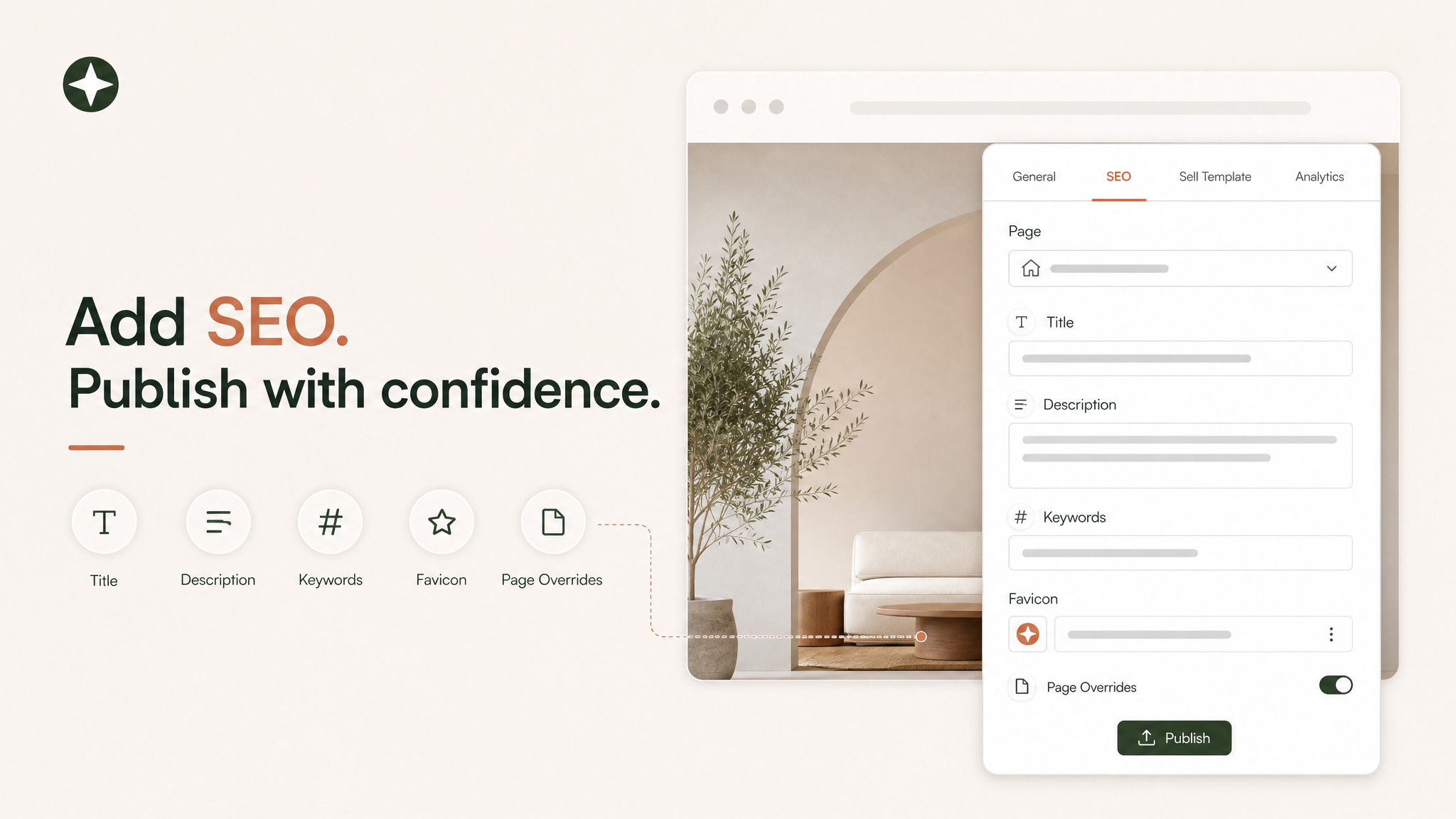
The short answer is simple: do not edit the website header by hand for normal SEO metadata. In Aura, the right place is the Publish popover. Open Publish, switch to the SEO tab, choose the page, and edit the title, keywords, description, favicon, and page-specific overrides before publishing.
SEO is not a single tag. It is a relationship between the public URL, the page title, the visible content, the preview image, the canonical domain, the sitemap, the robots file, and the way Google can crawl the final page.
Aura already has a dedicated SEO tab in the publishing flow and crawler-facing support for project-domain robots.txt, sitemap.xml, llms.txt, metadata injection, and analytics scripts. The real work is choosing metadata and site structure that help search engines and people understand what the page is actually about.
The Short Answer in Aura
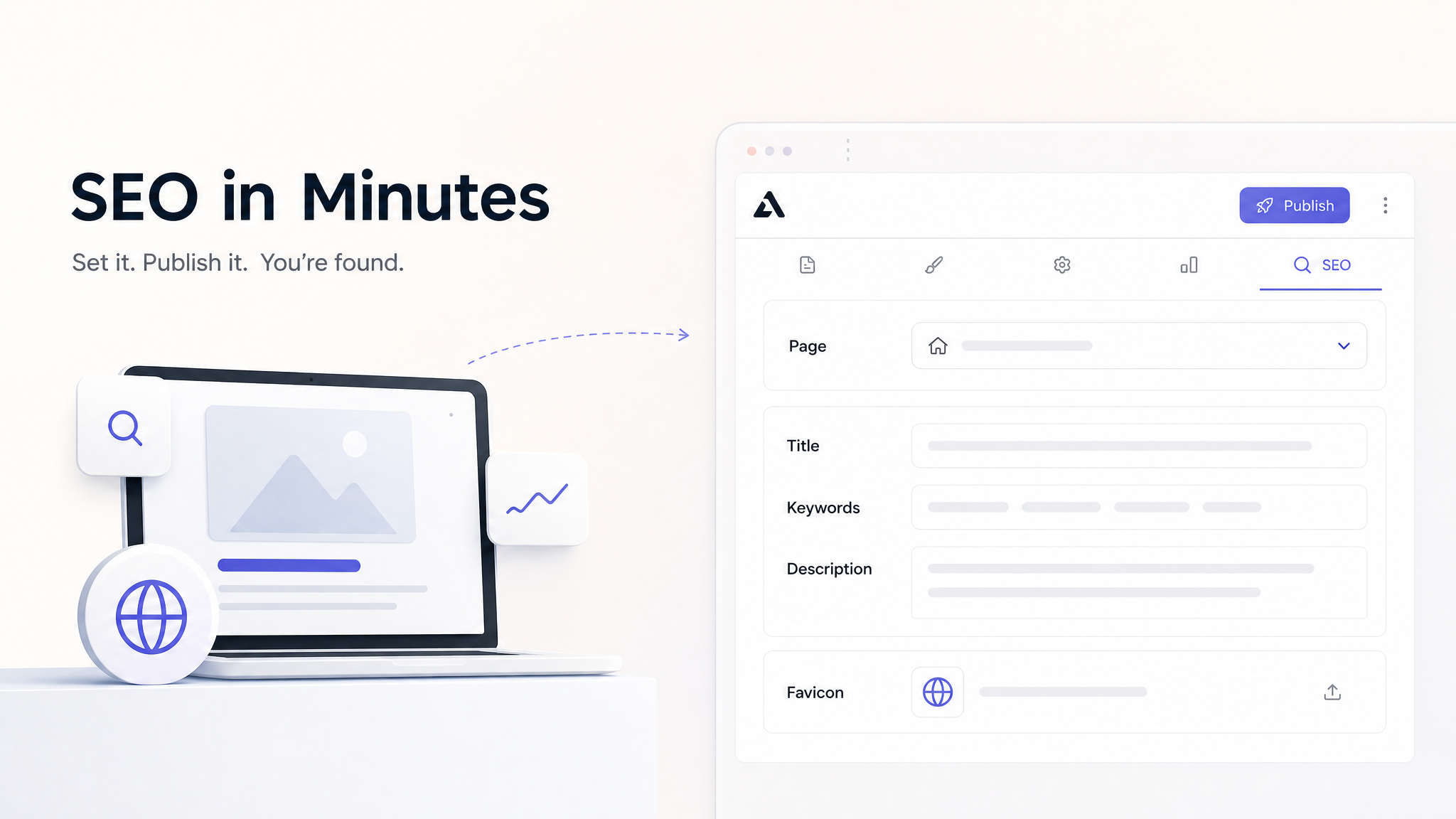
When someone asks how to add SEO to an Aura website:
Open the Aura project.
Click Publish.
Open the SEO tab.
Choose Home or a specific page from the Page dropdown.
Fill in Title, Keywords, and Description.
Upload a favicon if the project needs one.
Publish the site.
Aura can generate basic metadata, but generated SEO should be treated like a first draft. It may understand the visual intent of the page, but it does not always know the market, buyer, category, brand positioning, or phrases people use when they search.
Use the Home option as the default SEO for the site. Then override individual pages when their search intent is different. If a page would deserve a different search result on Google, it deserves different SEO in Aura.
What Aura Publishes Behind the Scenes
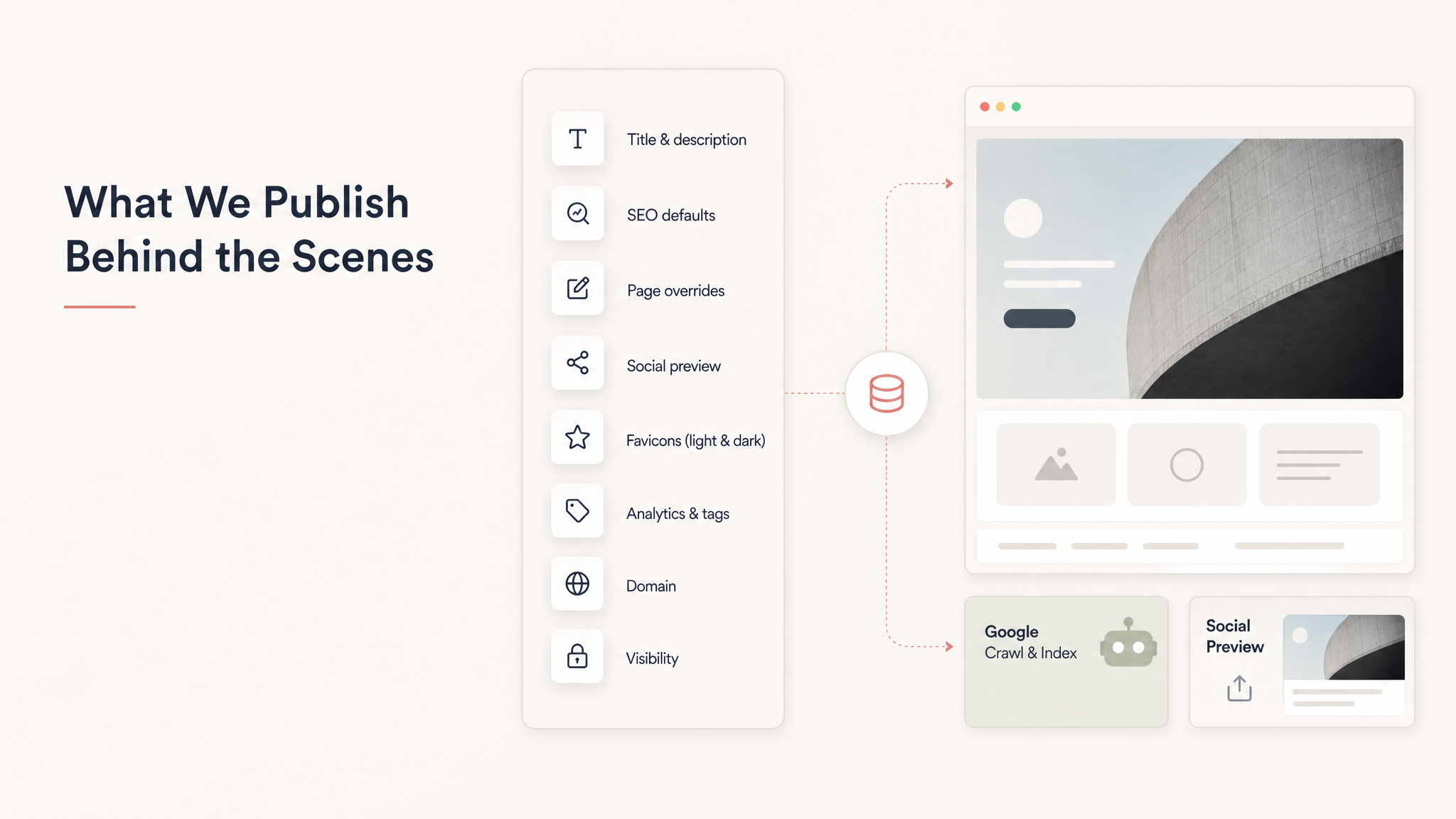
The current Aura publishing flow stores the important SEO pieces separately from the design files:
Project title and description
Default SEO title, description, and keywords
Page-specific SEO overrides
Social preview image data
Light and dark favicons
Google Analytics or Google Tag Manager IDs
Custom domain and public visibility
That separation matters because a published website has two audiences: people who see the page itself, and crawlers or preview bots that need reliable metadata before rendering a search result, social card, link preview, or indexed URL.
You still need strong visible content on the page. Metadata can influence how a result appears, but it cannot compensate for a page that is vague, thin, inaccessible, or disconnected from the search query.
Write Titles Like Promises, Not Labels
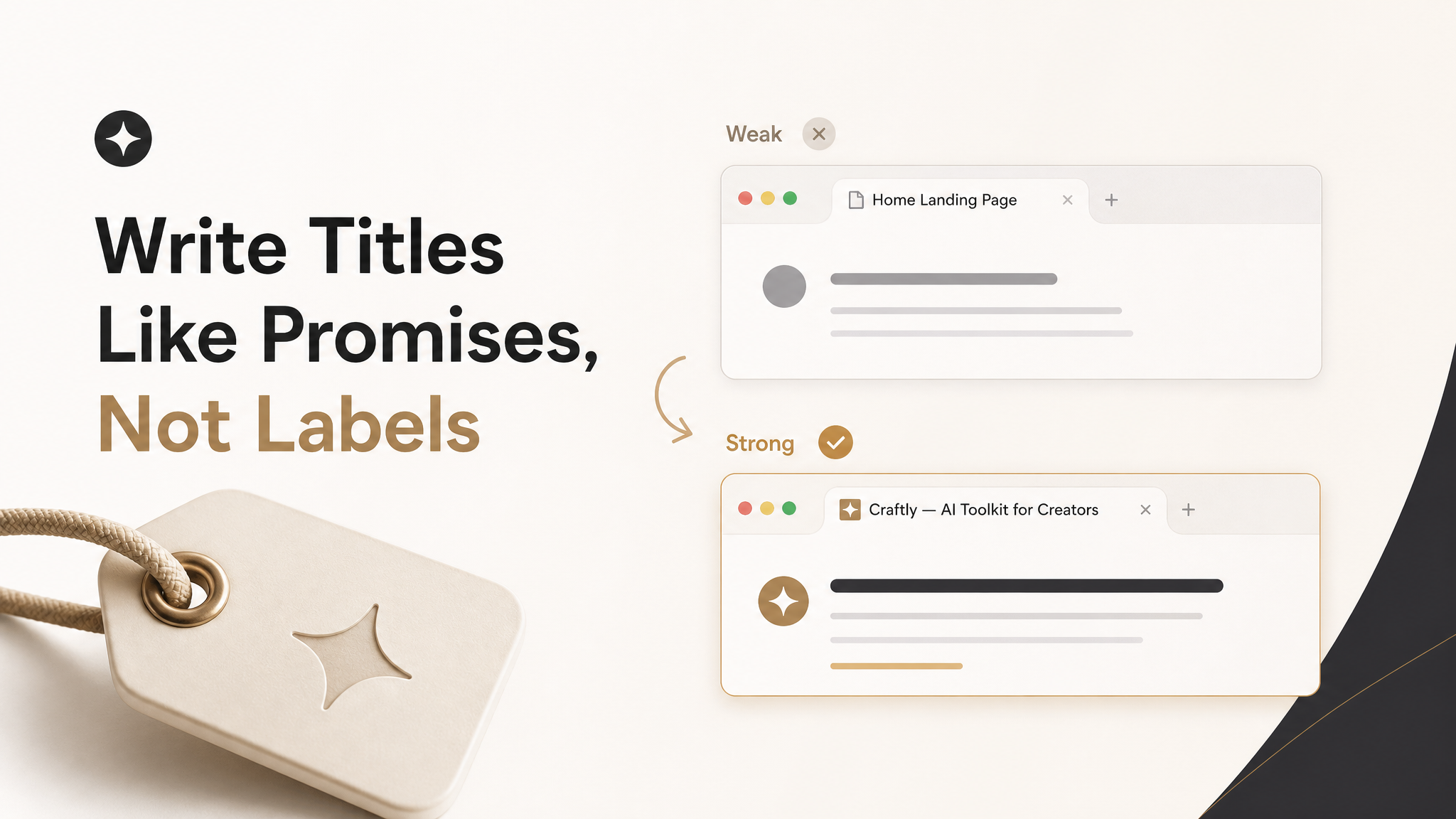
The title is usually the most important field you will write in the SEO tab. It becomes the strongest hint for the search result title, browser tab, saved bookmarks, and link previews.
Weak labels
- Home
- Landing Page
- SaaS Template
- My Portfolio
Strong promises
- Flowly - SaaS Workflow Builder Template
- Private Chef Portfolio for Luxury Events
- AI Resume Builder for Product Managers
- Singapore Wedding Photographer With Editorial Style
Use this formula for most Aura pages:
Page-specific promise - brand or site name
Keep the title readable. Do not turn it into a pile of keywords. A person should be able to scan it and understand why the page exists.
Write Descriptions That Sell the Click

The description field should explain what the page is, who it is for, and why someone should click. A good description is the tiny sales pitch that sits under the search result.
Use this pattern:
For [audience], this page helps you [outcome] with [specific proof, format, or feature].
Title
Use the actual promise of the page, not a file label. Put the specific topic near the front and include the brand when it improves recognition.
Description
Explain what the page is, who it is for, and why someone should click. Keep it specific without making it sound mechanical.
Keywords
Use a short comma-separated topic list that actually matches the page. Treat keywords as support, not as a replacement for useful page copy.
Before publishing, read your title and description together. Ask whether the result would feel specific, trustworthy, and meaningfully different beside competitors.
Use Page-Specific SEO for Multi-Page Sites
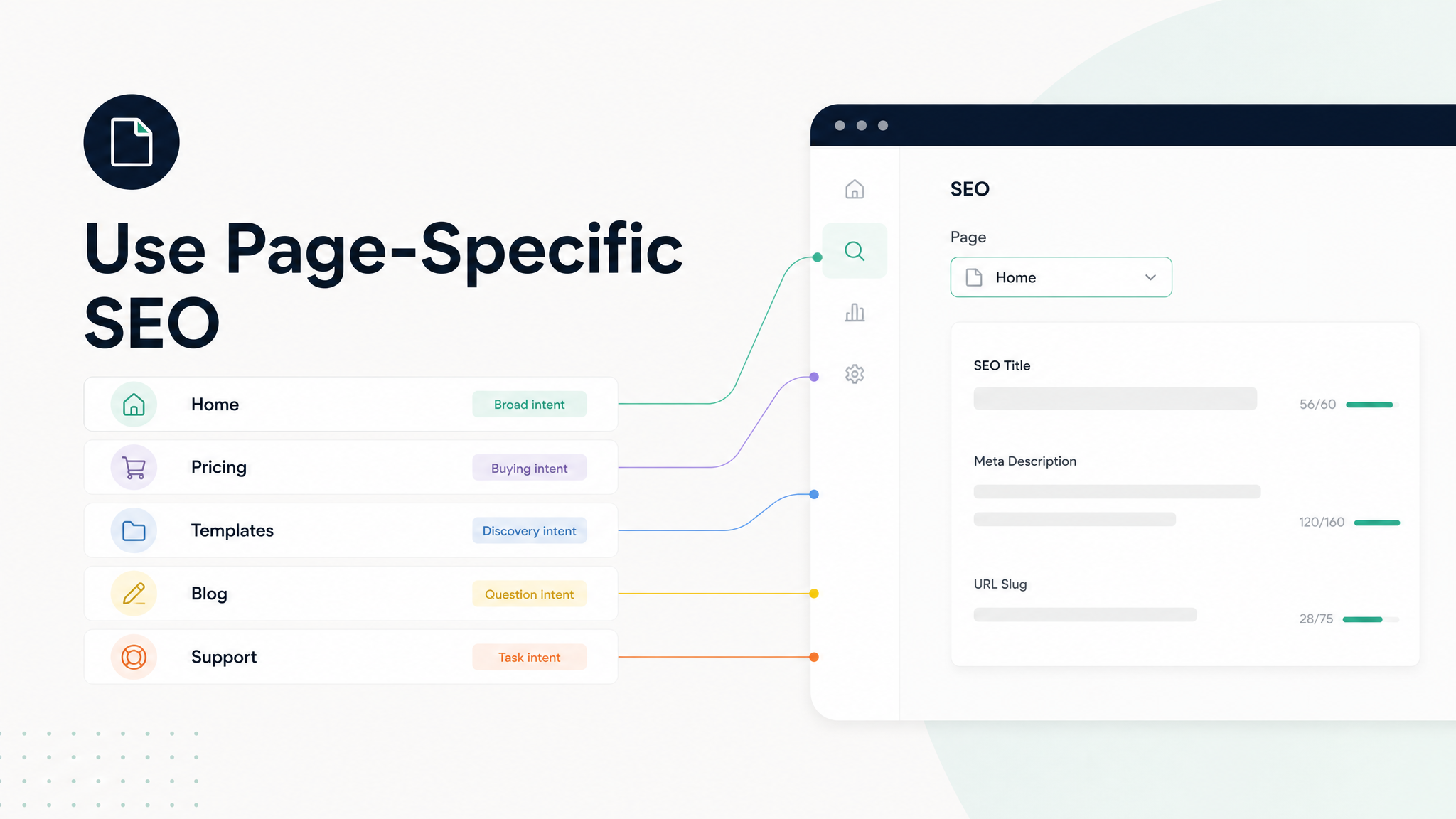
Aura's SEO tab has a Page dropdown. This is easy to miss, but it is the difference between basic SEO and useful SEO. Home is the broad default. Important pages should get their own search result.
| Page | Search Intent | Title Angle | Description Angle |
|---|---|---|---|
| Home | Brand/category | What the site is | Broad promise |
| Pricing | Buying | Plan details | Trial, price, guarantee |
| Templates | Discovery | Collection/category | What users can browse |
| Case study | Proof | Outcome/customer | Measurable result |
| Blog | Education | Question/problem | Practical answer |
Use page-specific SEO when a page targets a different query, audience, question, share preview, or buying intent.
Make the Page Match the Metadata

Metadata works best when it agrees with the page. If the SEO title says "AI Website Builder for SaaS Startups," the page should visibly include those ideas in natural places.
The H1 or main hero heading
The opening paragraph
Section headings
Alt text for relevant images
Button and link labels
FAQ questions
Case studies or examples
Do not hide all important meaning inside images. Aura can make beautiful visuals, but search engines need text they can read. For AI answer engines, clear headings, direct answers, visible facts, and well-structured sections make the page easier to understand and cite.
Domains, Slugs, Canonicals, and Duplicates
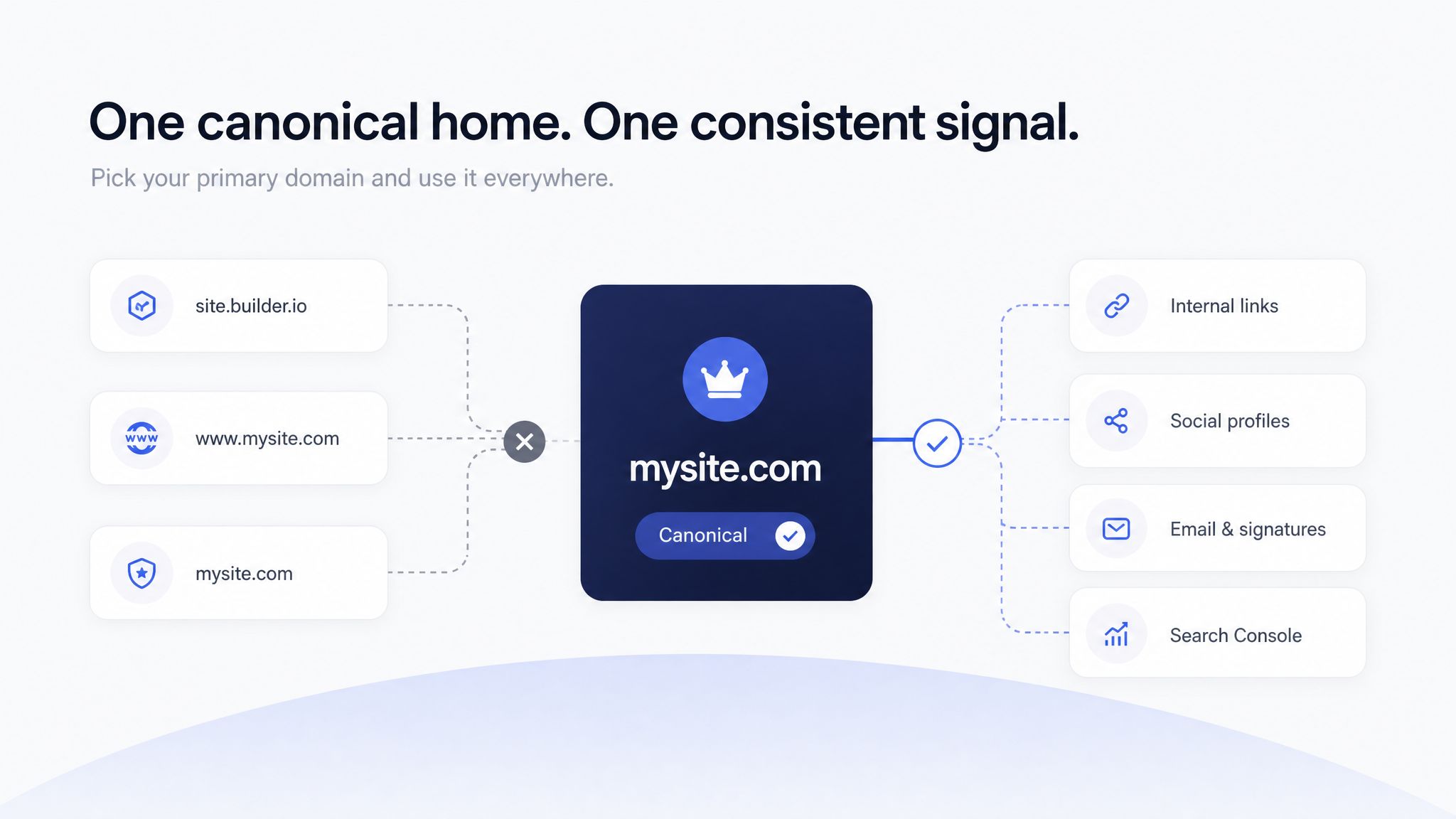
Domain choices affect how people remember your site and how consistently search engines see your URLs. Pick one primary host and use it consistently in links, social profiles, email signatures, ads, and Search Console.
For Aura projects, a practical domain strategy is:
Use the Aura subdomain while drafting and sharing internally.
Move serious public projects to a memorable custom domain when the site is ready.
Verify the domain in Google Search Console.
Submit the sitemap for the canonical domain.
Link to the canonical domain everywhere.
Avoid public duplicate copies on multiple hosts unless canonicalization is handled deliberately.
The domain is not the SEO strategy, but it is the address where the strategy compounds.
Images, Favicons, and Social Previews

Aura's publish flow can capture preview images, upload preview assets, and let you add social image URLs for page-specific SEO. It also supports light and dark favicons in the SEO tab.
Images need two things for SEO: relevance and context. Use real page screenshots or product visuals when possible, keep social-card text minimal and readable, and choose favicons that stay recognizable at 16x16 and 32x32.
If you add a page-specific Social Image URL in Aura, use an image that matches that page. A pricing page should not use a generic homepage hero image if the pricing page is what people will share.
Search Console Setup After Publishing
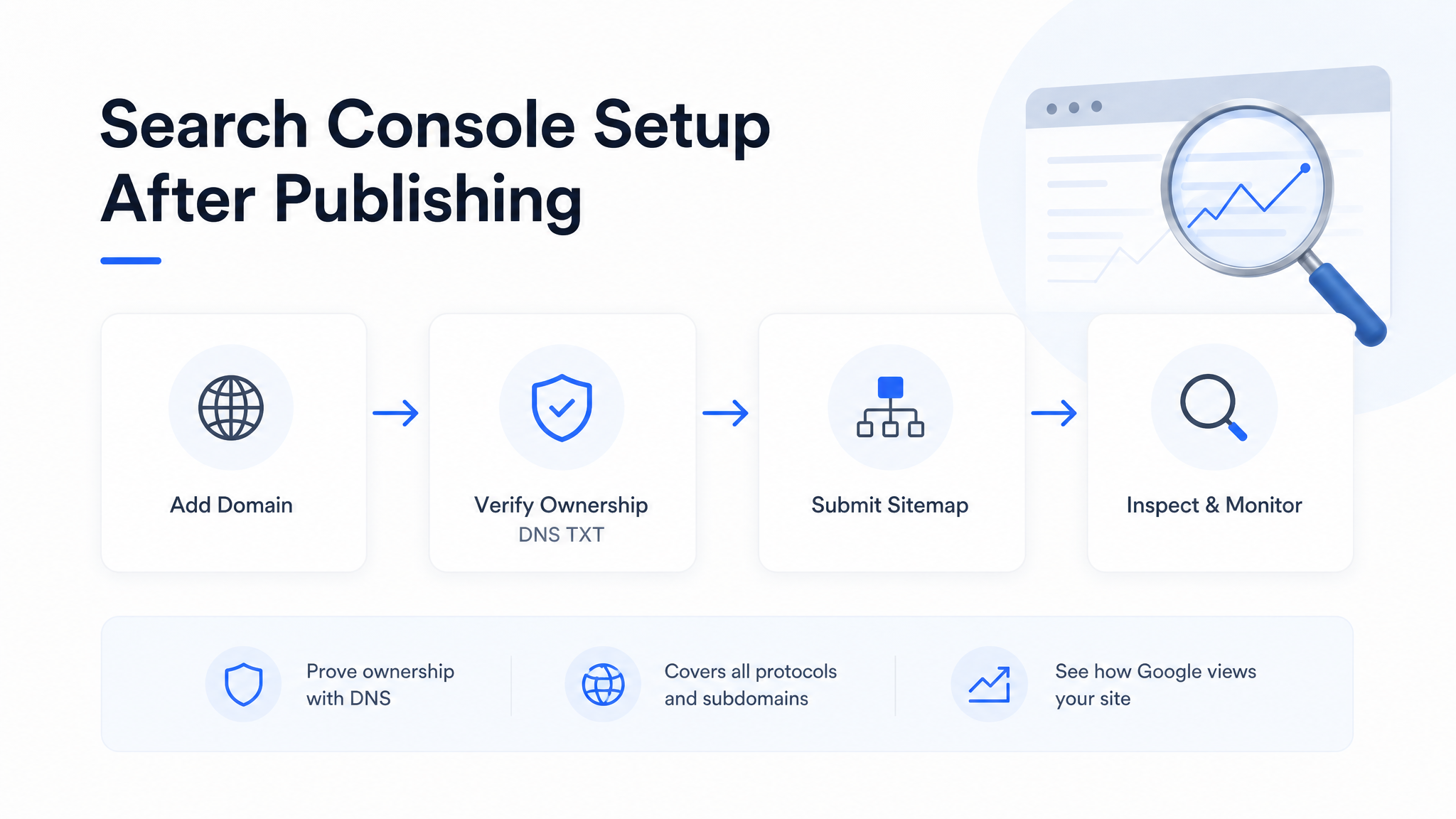
Google Webmaster Tools is now Google Search Console. After publishing an Aura site, Search Console is where you verify ownership, submit sitemaps, inspect URLs, and watch how Google sees your pages.
Go to Google Search Console.
Add a Domain property for your root domain, such as example.com.
Copy the TXT verification record.
Add it at your DNS provider.
Wait for DNS propagation.
Click Verify in Search Console.
Submit your sitemap.
Inspect the homepage URL.
Request indexing for the most important pages.
Search Console tells you how the site appears in Google Search. Google Analytics tells you what people do after they arrive. Use both when the site is important.
Sitemaps, Robots, and Indexing Checks
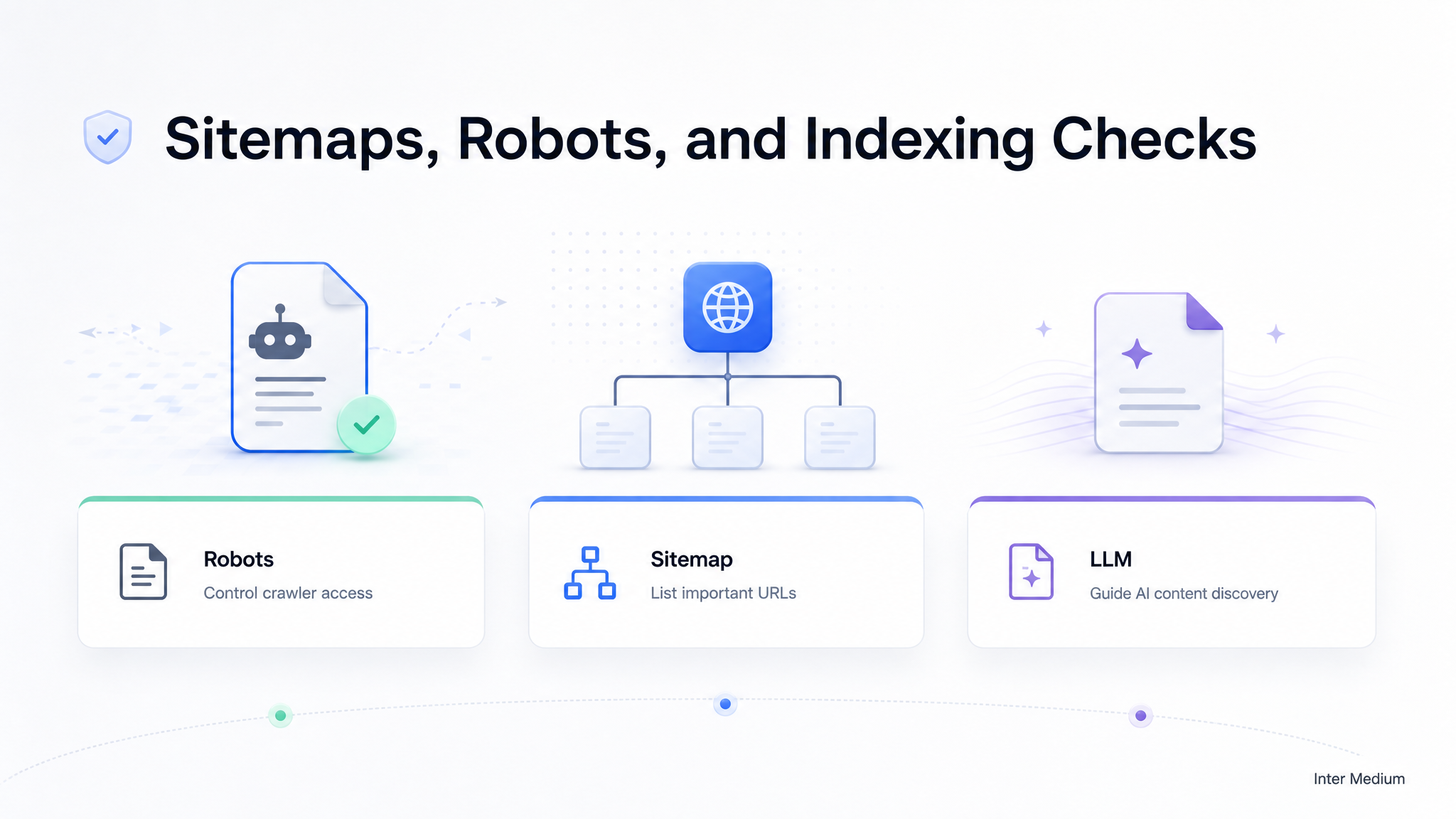
For published project domains, Aura's edge layer can serve robots.txt, sitemap.xml, and llms.txt. Those files help crawlers understand what they are allowed to fetch and which URLs matter.
robots.txt
Tells crawlers what they may request. It is not a secure way to hide private content.
sitemap.xml
Lists URLs you want search engines to know about, using fully qualified absolute URLs.
llms.txt
Gives AI tools a concise map of the site for answer-engine readability.
After publishing, check these URLs on the canonical host:
https://yourdomain.com/robots.txthttps://yourdomain.com/sitemap.xmlhttps://yourdomain.com/llms.txtif available
For new sites, indexing takes time. Publishing and submitting a sitemap does not guarantee instant ranking. It simply removes avoidable friction.
Measure, Learn, and Improve

SEO is not finished on publish day. Publish day is when the feedback loop starts. Search Console can show queries, impressions, click-through behavior, indexing state, canonical choices, and page issues. Analytics can show engagement, sources, CTA clicks, exits, and conversions.
Then improve the page:
Rewrite titles with clearer intent.
Make descriptions more specific.
Add real examples and proof.
Add an FAQ section.
Add internal links.
Improve image alt text.
Make the hero clearer.
Remove empty marketing language.
Add location terms for local pages.
Update stale screenshots or pricing references.
SEO rewards compounding clarity. A one-page Aura site can rank if it answers a specific problem better than the alternatives. A large site can fail if every page says vague things in a beautiful layout.
A Practical Launch Checklist

Before publishing an Aura site for search, run this checklist:
The homepage has a specific title, not just the brand name.
Every important page has a unique title and description.
Keywords are comma-separated and not stuffed.
The visible H1 agrees with the SEO title.
The page copy includes real audience, category, and offer language.
Images appear near relevant text and have useful alt text when exported or edited.
The favicon is recognizable in small browser tabs.
The social preview image is readable when cropped.
The page is public, not private.
The custom domain is the URL you want people to share.
You chose one canonical host, such as example.com or www.example.com.
The sitemap loads at the canonical domain.
robots.txt is not blocking the site.
Search Console ownership is verified.
The sitemap is submitted in Search Console.
The homepage and key pages pass URL Inspection.
Google Analytics or GTM is added only if you need behavior tracking.
The site has links from places real users can find it.
The main insight is this: Aura already gives you the publishing surface for SEO. The leverage comes from using it like a strategist, not a form filler.
Official References

Useful Google references for this workflow:
SEO FAQ
How do I add SEO to my Aura website?
Open the Publish popover, switch to the SEO tab, choose Home or a specific page, then fill in the title, keywords, description, favicon, and any page-specific overrides before publishing.
Do I need to edit the website header manually?
No. For normal SEO metadata, use the Publish SEO tab. Aura stores SEO fields with the published project so they survive republishing, page changes, and domain updates.
Can I customize SEO for each page?
Yes. Use the Page dropdown inside the SEO tab. Home works as the site default, and individual pages can have their own title, keywords, description, and social preview image.
What should I write in the SEO title?
Write a clear promise for the specific page, then add the brand when it helps recognition. Avoid generic titles like Home, Landing Page, or Page 1.
What should I check after publishing?
Check the public page, robots.txt, sitemap.xml, and llms.txt when available. Then verify the domain in Google Search Console, submit the sitemap, and inspect the most important URLs.
Does a custom domain help SEO?
A custom domain is not a ranking strategy by itself, but it gives the site a memorable canonical home. Pick one primary host and use it consistently in links, Search Console, and the sitemap.